Showing posts with label Tips and Tricks. Show all posts

Thursday, 20 November 2014


I have found a simple tricks to bypass youtube annoying age confirm process. I am writing about two simple tricks for it.

METHOD 1:-
Staying on YouTube If you want to stay on the official YouTube site, you can just remove the 'watch?' in the URL
and replace the '=' sign with a '/'.

For example:
youtube.com/watch?v=1223445
...becomes...
youtube.com/v/1223445

This bypasses the restriction and lets you go straight to watching the video without the age
confirmation.

METHOD 2:-
GOING OFF YOUTUBE If you don't mind being redirected to a different site, you can instead add "nsfw" in front of
YouTube in the URL.

youtube.com/watch?v=1223445
...becomes...
nsfwyoutube.com/watch?v=1223445

This takes you to a site dedicated, as the name
suggests, to letting you watch YouTube's NSFW side to your heart's content. Dont miss a single post hit like,share and feel free to
ask any computer related problems....!!!

Tuesday, 18 November 2014

Hi friends welcome back, today i'm going to do some fun using notepad and some batch programming.If you have any past  experience with coding or programming then it's good for you or you are just started with programming then don't fear i make this  tutorial simple for you guys.If you have any type of problem then just comment below.

Matrix Effect

Before i start this  tutorials i like to show you what is a Matrix Effect.


Step -1: Open up the Notepad and paste below code in that,

@echo off
:loop
COlor 0A
Title J J f f g g g g
echo 0 A 0 1 1 1 A 0 1 0 1 0 7 7 8 9 9 1 0 1 0 1 A 1 0 a d d f f 1 0 8 s 5 7 r 6 d 6  
echo 0 0 0 0 0 0 0 0 1 A 0 A 1 0 A 1 1 1 1 0 A 1 0 A 5 5 6 7 a n k k k 4 g f 5 g D 5
echo 0 1 0 1 0 A B J 0 3 4 0 1 0 1 0 1 B A A O i d d 3 3 4 4 6 7 7 g u 6 d 4 f 4 f 4
echo 0 2 3 1 1 1 5 5 6 5 6 8 9 5 4 5 4 5 5 4 5 5 6 4 f f f g j d g d f g d 7 g a 4 f 6 8
echo 2 4 5 6 5 5 6 5 9 4 5 7 7 7 7 8 9 9 0 66 6 1 5 5 6 4 5 5 8 6 4 4 6 4 5 d 2 1 e
goto :loop 

Step -2: save this note as matrix.bat
Step -3: Run the .bat file and you done.

Explanation of the code

First word "echo" is used to tell the pc that it is a Batch file and about it mode "off" or "on".Here echo is off so the code is run in background.In second line "loop" is a variable which can be "int" or "float".You can change the Name "loop". In third line "color" will define the color of the effect.Here 0A is the code for Green ,go and change the value to 0B,0C to see what happened.Now in forth line Title is define the title of the code which you have written.Now here echo again and it's value.You can use what ever you want to use in this area under echo.and in the last line a goto function is used which run this loop again and again.and make the effect more real.   

Hope you like my tutorial.thank you

Sunday, 16 November 2014

Hallo friends welcome back,today i'm going to list out top 3 most powerful and advance android launchers for your Mobile.I made this list on the bases of my very own experience.

1-Apus Launcher   

Apus launcher is thee most powerful launcher out in this market.It provides you speed of 170 kmph to run you android very fast.I use this app and  believe  me friends this really works.You get all of this in very small pack.
Download Link - click here


2-Zero Launcher 

It is same as Apus launcher.Some highlights are as follows.It comes in 1 MB Pack.It takes .2 seconds to launch.In my opinion this app is best for Samsung Galaxy devices.
Download Link - click here


3- Nova Launcher 

Nova launcher don't need any  explanation.It's best launcher ever made.It will supercharge your phone with speed of light.
Download Link - Click Here
  

Saturday, 15 November 2014

Welcome back my friends.Today i am going to explan you how to download videos "facebook.com".Let's start this tutorials.

STEP-1: Click on the video which you want to download.
STEP-2: copy the link of the video.
STEP-3: Go to this link on the next tab
STEP-4: Paste link of the specific box and hit download

That's it. congratulation you have download your desired video  successfully.
Hope you like my tutorial if it helps you in any way.

Wednesday, 24 September 2014

How To Change Your Ip In Less Then 1 Minute

1. Click on "Start" in the bottom left hand corner of screen
2. Click on "Run"
3. Type in "command" and hit ok

You should now be at an MSDOS prompt screen.

4. Type "ipconfig /release" just like that, and hit "enter"
5. Type "exit" and leave the prompt
6. Right-click on "Network Places" or "My Network Places" on your desktop.
7. Click on "properties"

You should now be on a screen with something titled "Local Area Connection", or something close to that, and, if you have a network hooked up, all of your other networks.

8. Right click on "Local Area Connection" and click "properties"
9. Double-click on the "Internet Protocol (TCP/IP)" from the list under the "General" tab
10. Click on "Use the following IP address" under the "General" tab
11. Create an IP address (It doesn't matter what it is. I just type 1 and 2 until i fill the area up).
12. Press "Tab" and it should automatically fill in the "Subnet Mask" section with default numbers.
13. Hit the "Ok" button here
14. Hit the "Ok" button again

You should now be back to the "Local Area Connection" screen.

15. Right-click back on "Local Area Connection" and go to properties again.
16. Go back to the "TCP/IP" settings
17. This time, select "Obtain an IP address automatically"
tongue.gif 18. Hit "Ok"
19. Hit "Ok" again
20. You now have a new IP address

With a little practice, you can easily get this process down to 15 seconds.

Wednesday, 17 September 2014

Getting used to using your keyboard exclusively and leaving your mouse behind will make you much more efficient at performing any task on any Windows system. I use the following keyboard shortcuts every day:

Windows key + R = Run menu

This is usually followed by:
cmd = Command Prompt
iexplore + "web address" = Internet Explorer
compmgmt.msc = Computer Management
dhcpmgmt.msc = DHCP Management
dnsmgmt.msc = DNS Management
services.msc = Services
eventvwr = Event Viewer
dsa.msc = Active Directory Users and Computers
dssite.msc = Active Directory Sites and Services
Windows key + E = Explorer

ALT + Tab = Switch between windows

ALT, Space, X = Maximize window

CTRL + Shift + Esc = Task Manager

Windows key + Break = System properties

Windows key + F = Search

Windows key + D = Hide/Display all windows

CTRL + C = copy

CTRL + X = cut

CTRL + V = paste

Also don't forget about the "Right-click" key next to the right Windows key on your keyboard. Using the arrows and that key can get just about anything done once you've opened up any program.


Keyboard Shortcuts

[Alt] and [Esc] Switch between running applications

[Alt] and letter Select menu item by underlined letter

[Ctrl] and [Esc] Open Program Menu

[Ctrl] and [F4] Close active document or group windows (does not work with some applications)

[Alt] and [F4] Quit active application or close current window

[Alt] and [-] Open Control menu for active document

Ctrl] Lft., Rt. arrow Move cursor forward or back one word

Ctrl] Up, Down arrow Move cursor forward or back one paragraph

[F1] Open Help for active application

Windows+M Minimize all open windows

Shift+Windows+M Undo minimize all open windows

Windows+F1 Open Windows Help

Windows+Tab Cycle through the Taskbar buttons

Windows+Break Open the System Properties dialog box


acessability shortcuts

Right SHIFT for eight seconds........ Switch FilterKeys on and off.

Left ALT +left SHIFT +PRINT SCREEN....... Switch High Contrast on and off.

Left ALT +left SHIFT +NUM LOCK....... Switch MouseKeys on and off.

SHIFT....... five times Switch StickyKeys on and off.

NUM LOCK...... for five seconds Switch ToggleKeys on and off.

explorer shortcuts

END....... Display the bottom of the active window.

HOME....... Display the top of the active window.

NUM LOCK+ASTERISK....... on numeric keypad (*) Display all subfolders under the selected folder.

NUM LOCK+PLUS SIGN....... on numeric keypad (+) Display the contents of the selected folder.

NUM LOCK+MINUS SIGN....... on numeric keypad (-) Collapse the selected folder.

LEFT ARROW...... Collapse current selection if it's expanded, or select parent folder.

RIGHT ARROW....... Display current selection if it's collapsed, or select first subfolder.


Type the following commands in your Run Box (Windows Key + R) or Start Run

devmgmt.msc = Device Manager
msinfo32 = System Information
cleanmgr = Disk Cleanup
ntbackup = Backup or Restore Wizard (Windows Backup Utility)
mmc = Microsoft Management Console
excel = Microsoft Excel (If Installed)
msaccess = Microsoft Access (If Installed)
powerpnt = Microsoft PowerPoint (If Installed)
winword = Microsoft Word (If Installed)
frontpg = Microsoft FrontPage (If Installed)
notepad = Notepad
wordpad = WordPad
calc = Calculator
msmsgs = Windows Messenger
mspaint = Microsoft Paint
wmplayer = Windows Media Player
rstrui = System Restore
netscp6 = Netscape 6.x
netscp = Netscape 7.x
netscape = Netscape 4.x
waol = America Online
control = Opens the Control Panel
control printers = Opens the Printers Dialog


internetbrowser

type in u're adress "google", then press [Right CTRL] and [Enter]
add www. and .com to word and go to it


For Windows XP:

Copy. CTRL+C
Cut. CTRL+X
Paste. CTRL+V
Undo. CTRL+Z
Delete. DELETE
Delete selected item permanently without placing the item in the Recycle Bin. SHIFT+DELETE
Copy selected item. CTRL while dragging an item
Create shortcut to selected item. CTRL+SHIFT while dragging an item
Rename selected item. F2
Move the insertion point to the beginning of the next word. CTRL+RIGHT ARROW
Move the insertion point to the beginning of the previous word. CTRL+LEFT ARROW
Move the insertion point to the beginning of the next paragraph. CTRL+DOWN ARROW
Move the insertion point to the beginning of the previous paragraph. CTRL+UP ARROW
Highlight a block of text. CTRL+SHIFT with any of the arrow keys
Select more than one item in a window or on the desktop, or select text within a document. SHIFT with any of the arrow keys
Select all. CTRL+A
Search for a file or folder. F3
View properties for the selected item. ALT+ENTER
Close the active item, or quit the active program. ALT+F4
Opens the shortcut menu for the active window. ALT+SPACEBAR
Close the active document in programs that allow you to have multiple documents open simultaneously. CTRL+F4
Switch between open items. ALT+TAB
Cycle through items in the order they were opened. ALT+ESC
Cycle through screen elements in a window or on the desktop. F6
Display the Address bar list in My Computer or Windows Explorer. F4
Display the shortcut menu for the selected item. SHIFT+F10
Display the System menu for the active window. ALT+SPACEBAR
Display the Start menu. CTRL+ESC
Display the corresponding menu. ALT+Underlined letter in a menu name
Carry out the corresponding command. Underlined letter in a command name on an open menu
Activate the menu bar in the active program. F10
Open the next menu to the right, or open a submenu. RIGHT ARROW
Open the next menu to the left, or close a submenu. LEFT ARROW
Refresh the active window. F5
View the folder one level up in My Computer or Windows Explorer. BACKSPACE
Cancel the current task. ESC
SHIFT when you insert a CD into the CD-ROM drive Prevent the CD from automatically playing.

Use these keyboard shortcuts for dialog boxes:

To Press
Move forward through tabs. CTRL+TAB
Move backward through tabs. CTRL+SHIFT+TAB
Move forward through options. TAB
Move backward through options. SHIFT+TAB
Carry out the corresponding command or select the corresponding option. ALT+Underlined letter
Carry out the command for the active option or button. ENTER
Select or clear the check box if the active option is a check box. SPACEBAR
Select a button if the active option is a group of option buttons. Arrow keys
Display Help. F1
Display the items in the active list. F4
Open a folder one level up if a folder is selected in the Save As or Open dialog box. BACKSPACE

If you have a Microsoft Natural Keyboard, or any other compatible keyboard that includes the Windows logo key and the Application key , you can use these keyboard shortcuts:


Display or hide the Start menu. WIN Key
Display the System Properties dialog box. WIN Key+BREAK
Show the desktop. WIN Key+D
Minimize all windows. WIN Key+M
Restores minimized windows. WIN Key+Shift+M
Open My Computer. WIN Key+E
Search for a file or folder. WIN Key+F
Search for computers. CTRL+WIN Key+F
Display Windows Help. WIN Key+F1
Lock your computer if you are connected to a network domain, or switch users if you are not connected to a network domain. WIN Key+ L
Open the Run dialog box. WIN Key+R
Open Utility Manager. WIN Key+U

accessibility keyboard shortcuts:

Switch FilterKeys on and off. Right SHIFT for eight seconds
Switch High Contrast on and off. Left ALT+left SHIFT+PRINT SCREEN
Switch MouseKeys on and off. Left ALT +left SHIFT +NUM LOCK
Switch StickyKeys on and off. SHIFT five times
Switch ToggleKeys on and off. NUM LOCK for five seconds
Open Utility Manager. WIN Key+U

shortcuts you can use with Windows Explorer:


Display the bottom of the active window. END
Display the top of the active window. HOME
Display all subfolders under the selected folder. NUM LOCK+ASTERISK on numeric keypad (*)
Display the contents of the selected folder. NUM LOCK+PLUS SIGN on numeric keypad (+)
Collapse the selected folder. NUM LOCK+MINUS SIGN on numeric keypad (-)
Collapse current selection if it's expanded, or select parent folder. LEFT ARROW
Display current selection if it's collapsed, or select first subfolder. RIGHT ARROW

Hope you like it enjoy ;-)

Sunday, 7 September 2014

Here i come with some secret codes for your Nokia phone. Try this code and have fun ;) :v

*#9999# Phones software version if *#0000# does not work

#pw+1234567890+­1# Provider Lock Status. (use the "*" button to
obtain the "p,w" and "+" symbols)

#pw+1234567890+­2# Network Lock Status. (use the "*" button to
obtain the "p,w" and "+" symbols)

#pw+1234567890+­3# Country Lock Status. (use the "*" button to
obtain the "p,w" and "+" symbols)

#pw+1234567890+­4# SIM Card Lock Status. (use the "*" button to
obtain the "p,w" and "+" symbols)

*#147# This lets you know who called you last (Only vodofone)

*#1471# Last call (Only vodofone)

*#21# This phone code allows you to check the number that "All
Calls" are diverted to

*#2640# Displays phone security code in use

*#30# Lets you see the private number

*#43# Allows you to check the "Call Waiting" status of your cell
phone.

*#61# Allows you to check the number that "On No Reply" calls
are diverted to

*#62# Allows you to check the number that "Divert If Unreachable
(no service)" calls are diverted to

*#67# Allows you to check the number that "On Busy Calls" are
diverted to

*#67705646# Phone code that removes operator logo on 3310 &
3330

*#73# Reset phone timers and game scores

*#746025625# Displays the SIM Clock status, if your phone
supports this power saving feature "SIM Clock Stop Allowed", it means you will get the best standby time possible

*#7760# Manufactures code

*#7780# Restore factory settings

*#8110# Software version for the nokia 8110

*#92702689# Displays - 1.Serial Number, 2.Date Made,
3.Purchase Date, 4.Date of last repair (0000 for no repairs), 5.Transfer User Data. To exit this mode you need to switch your phone off then on again

*#9487034512345­6789# Deactivate the PWM-Mem

**21*number# Turn on "All Calls" diverting to the phone number
entered

**61*number# Turn on "No Reply" diverting to the phone
number entered

**67*number# Turn on "On Busy" diverting to the phone number
entered 12345 This is the default security code press and hold # Lets you switch between lines

*#war0anty# - SIMLOCK info

*3370# - Enhanced Full Rate ON

#3370# - OFF

*4720# - alternative sound quality codec ON

#4720# - OFF

*#7760# - production serial no.

*#2820# - Bluetooth info.

*#73# - reset phone timers and game scores.

*#7370925538# - delete all the content of the wallet and the wallet code.

*#7370# - soft format ? erases all telephone memory.

[Green]*3 - hard format ? if only the telephone memory is formatted, puts back the attitudes and reboots

*#delset# - MMS/GPRS settings removal

NOTE: code depends on phone model


Saturday, 30 August 2014

This summary is not available. Please click here to view the post.

Saturday, 12 July 2014

So you want to get good page rank on search engine.This is the best way in it's category which helps you to get page rank.To grab much traffic to your website it's important to have good page rank on search engine.The trick which is i am going to explain you is 101% FREE and easy to do.You can submit your website using Ping technology.Actually it do not submit your website,it update search engine about your website.
There are many website where you can ping you website.Some of paid and some of Free.In this post i will list 5 top free pinging website which are 100% work for me.

Top 5 Ping website

1-Blog Sites List - This is the website which works for me very well.I will highly recommend this website.you have to just add the code given by the site and then enter required information and done. It's super fast and easy.Your get the result in just 2 days and you will be happy with it.

2-GooglePing- This is similar to the other websites.To submit your website you have to fill the form and submit it.It will submit your website to the different Google website world wide.

3-Ping-o-Matic- This is new website and get much popularity.It's similar to the other website.

4-Pingler-  Pingler provide free and paid service both.A paid subscription allows you to store your URLs in your account. Your URLs will be automatically pinged daily.In free service you have to submit your site manually.

5-Ping My Url-   This Ping website submit you Url to 1418 different websites in just one click.It will also provide social ping and global ping.

Take a look on my other post.


Friday, 11 July 2014

In just 5 min you can learn how to create your own sitemap for your website or blogspot and transfer ton of traffic to your website form search engine like Google.

Follow these Step to create and submit sitemap to your blogspot

STEP-1

Click here and enter your website URL and click on "Generate Sitemap"
Copy the code as shown in the image.

STEP-2

Go to your Blogspot dashboard and then go to the settings

STEP-3

Click on search preference and then robot.txt
enable it and then paste the code which is copy in step-1
for more detale see on the image

STEP-4

Now go to Open Webmaster Tool and login with you Google id.then add your website and go to the sitemap setting and then add the code as shown in the image.
code- 
atom.xml?redirect=false&start-index=1&max-results=500
 
Congratulation you have success fully submit your sitemap
Take a look on my other blog post
1-How to get ton of like for free
2-How to download youtube videos
3-How to get ton of traffic to your website
 

Thursday, 10 July 2014

Get lots of Likes on Your Facebook Page for Free!!!!!


Today i am going to tell you a secret method to get tons of Facebook like daily.There are two tricks which i am going to explain you.

TRICK-1

The trick which i am going to teach you is "Like Exchanging".This method is completely valid. In this method you have to Post your fan page link onto a group and that's it.when other page admins see you post into group and post your link to there pages.then the fans of other pages pages see your page link and like your page. It's seems very simple but it's very effective.I have a page "I love the music which explain exactly what i feel". I use this trick on that and now i have 36k likes on my page.There are some groups out there who done this job for you.Just search on Facebook "S4S Group".and there we go you have 100's of group where you can do it for free.Join them now and get 1000 like today.


TRICK-2 

You can get lots of like on your fan page with like 4 like method.Generally its very complicated to doing "like 4 like" but it being very simple when many admins come to single platform and do like 4 like. The plate form is "Traffup". Traffup is a single website which i am only find who do it for free.The concept is very simple you have to like others fan page to get point and then spend your point to get likes on your fan page.Join this service is totally free.

Hope you like my other posts

1- Top 3 Most profitable blogging Niche for beginners 
2- Submit your website or blog to search engines (100% working trick)
3- Download YouTube Videos and Browse Facebook Using Your College's WiFi


Tuesday, 23 July 2013

Its very simple just follow my instructions.

when you done this tutorial your plug-in look like this


Step-1

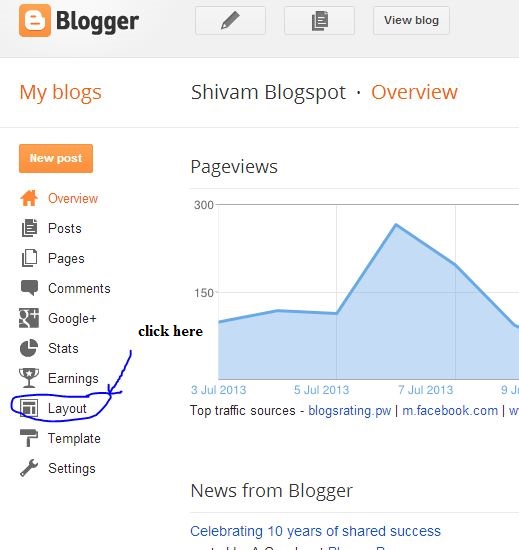
Go to your blogger dashboard than choose Layout


Step-2

Than "add a gadget"


Step-3

Choose "HTML".


Step-4

Select a topic and paste this code this as shown in the image.

<iframe src="//www.facebook.com/plugins/follow?href=https%3A%2F%2Fwww.facebook.com%2FShvmgpt11&amp;layout=standard&amp;show_faces=true&amp;colorscheme=light&amp;width=450&amp;height=80" scrolling="no" frameborder="0" style="border:none; overflow:hidden; width:450px; height:80px;" allowTransparency="true"></iframe>

Find and Replace with your facebook ID-shvmgpt11

Congratulation you done this tutorial success fully.
subscribe us to get your free eBook and enjoy.

Friday, 19 July 2013

Are you having very low traffic on your website? want more traffic to your website?
Now here is 100% working Trick which i personally use on my other blogs to gain more traffic.I have listed top 10 traffic exchanging websites which helps you to get more traffic on your website instantly.

Here is the list of traffic exchange websites.These sites are free to use.If you want to sing up at any websites than click on "click here" to go to that site.If you need or give any kind of advise than plz drop a comment below. Thank you :)

1- Easy hits 4 U

Easy hits for you is a premium website in the field of driving traffic. this site is on air in year 2003 and have become number 1 traffic exchange website.Site register 11000 new registration per month and 1000000 page view per day. this site have a feature of affiliate marketing so you send friends to this site and earn credit for that. You can promote you website there by adding your website there. the site follow 1:1 and 2:1 ratio. To sign up there click here


As Easyhits4u 10khits is a leading traffic exchange website i personally use this website to driving traffic on my blogs.Its a good option if you have not want to go with Easyhits4u or other website. Its follow 2:1 ratio and time taken is 10 sec at a page. This site offer 10000 credit ( means 20000 page view) if you view 1000 pages. To sign up here click here


Traffup offer visible traffic of your website stats in just 1 min. Traffup not only helps you to get more traffic on your website but its help you to get more followers on your twitter account. Traffup also have affiliate program facility so that you can invite your fb,twitter and email friends to join this site and behalf of this traffup gives you a 150 points.To register here click here  


4-Trafficg 

Trafficg is another a better option for you as other.This is free,easy,fast and ultimate.Its only delever traffic to your website. you get 10 or more credite every day. You can gain your targated area with this website.
To join this site click here 


5-I love hits
                           
I love hits is for those persons who really like hits. It is free to use. This site is started since 2001 and from 2001 he register 150000 people who now gain 1000 of daily views. This site also have affiliate marketing.
To join this site click here


Wednesday, 10 July 2013

Social portion is very important part of our website because a huge number of people comes from there.So its being very important to make it easy to people should connect with your site.Solution of this problem is " social widgets". So today i am going to show you how to insert all in one social widget on your blogger website.

When you done this tutorial your widget look like this.

Step-1

Go to your Blogger dashboard -> Layout


Step-2

Click on add a gadget.Than select a HTML


Step-3

Select a subject and Copy & Paste this code to there.

<div class="btnt-chronicl-social"><ul><li><a class="rss" href="http://feeds.feedburner.com/ShivamBlogspot">Subscribe to the RSS Feed</a></li> <li><a class="twitter" href="https://twitter.com/viewandroid">Follow me on Twitter</a></li> <li><a class="facebook" href="https://www.facebook.com/shivamblogspot">Find me on Facebook</a></li> <li><a class="google" href="https://plus.google.com/106038532455092952029" rel="author">Join me on Google+</a></li> <li><a class="linkedin" href="http://in.linkedin.com/your url">Connect with me on LinkedIn</a></li> <li><a class="youtube" href="http://www.youtube.com/user/sbstvable">Watch me on YouTube</a></li>
</ul></div><style type="text/css">.btnt-chronicl-social { width: 100%; } .btnt-chronicl-social ul { border: 1px solid #CCCCCC; margin: 0; padding: 0; } .btnt-chronicl-social ul li { list-style:none; padding: 0; text-transform: none; border-bottom: 1px solid #CCCCCC; border-top: 1px solid #FFFFFF; } .btnt-chronicl-social ul li:first-child { border-top: 0 none; } .btnt-chronicl-social ul li:last-child { border-bottom: 0 none; } .btnt-chronicl-social ul li a { background-color: #F2F2F2 !important; color: #404040; display:block; } .btnt-chronicl-social ul li a:hover { background-color: #fafafa !important; } .btnt-chronicl-social ul li .rss { background: url("http://i1203.photobucket.com/albums/bb382/chandeep10/social-icons/RSS-1.png") no-repeat scroll 10px center #F87E12; padding: 17.5px 60px; } .btnt-chronicl-social ul li .twitter { background: url("http://i1203.photobucket.com/albums/bb382/chandeep10/social-icons/Twitter.png") no-repeat scroll 10px center #4CACEE; padding: 17.5px 60px;} .btnt-chronicl-social ul li .facebook { background: url("http://i1203.photobucket.com/albums/bb382/chandeep10/social-icons/Facebook-1.png") no-repeat scroll 10px center #3B5998; padding: 17.5px 60px; } .btnt-chronicl-social ul li .google { background: url("http://i1203.photobucket.com/albums/bb382/chandeep10/social-icons/google.png") no-repeat scroll 10px center #D44937; padding: 17.5px 60px; } .btnt-chronicl-social ul li .linkedin { background: url("http://i1203.photobucket.com/albums/bb382/chandeep10/social-icons/LinkedIn-1.png") no-repeat scroll 10px center #3692C3; padding: 17.5px 60px; } .btnt-chronicl-social ul li .youtube { background: url("http://i1203.photobucket.com/albums/bb382/chandeep10/social-icons/Youtube-1.png") no-repeat scroll 10px center #C6312B; padding: 17.5px 60px; } .social-about { display: none; }</style>


Note- Find and change that following by yours 

  1. http://feeds.feedburner.com/ShivamBlogspot
  2. https://twitter.com/viewandroid
  3. https://www.facebook.com/shivamblogspot
  4. https://plus.google.com/106038532455092952029
  5. http://www.youtube.com/user/sbstvable

Congratulation,you have done this tutorial. for more tutorial follow our website on facebook or you can follow us only by your email address.


Friday, 5 July 2013

Here is the specification basic comparison between Micromax canvas hd and Intex aqua I5. Take a look.


Wednesday, 3 July 2013

In these days we can not afford if a hacker hack your computer and steal your personal and secret files from your PC. So what is solution of this problem? cloud storage. Cloud storage is only why for a unique way to protect your file from these activities. An another cause of store your files online is if your phone have not enough memory than you can cloud those files and access these file from any where. Here i am sort listed some most user friendly cloud storage portals. where you can store your files,videos,images etc for free.


1- Google Drive

Cloud storage is also deliver by Google. Name Google drive. Its provide you 15GB of free storage for lifetime.If you want than you can also share your files,videos,images with you family,friends and fans.You can access Google drive from your Google account.You can access your docs,videos and image offline as well.If you have an android phone than you can download Google drive app from Google play.

2- Dropbox 

Dropbox is also a good option for you.It is provide only 5GB of storage but you can also expand you GBs by buying extra space.As Google drive you can also access your stuffs offline as well.You should also share your stuffs online on Facebook,Twitter and other social networking websites. It provide you double step verification.Its also available on android and IOS platforms.You can and download dropbox for your pc as well so that you should always keep in touch with your memories.

3- 4shared 

4shared is similar to Google drive.As Google drive 4shared provide 15GB of storage. 4shared have a feature of drop-down manu. Its makes simple to share your files.Its avalable on android ios and other working platforms.

4- JustCloud 

There are several reason why choose Justcloud.
  • Unlimited cloud storage 
  • 100% automated backup
  • complete data security 
  • Lost laptop? find it with justcloud
  • Drop & down feature 
It is avlable on all platforms. You can download them. For android user you should download justcloud from     Google play.

5-Box

Box is similar to other cloud storage portal. Its provide 5GB of storage on personal account.You can share you file online.Its quick and easy.It is avlable on android and ios platforms.you can download box from Google play.

My Recommendation 

Google drive is best for all because it is available for all platforms. Its free,fast,easy and you have not to register for that if you have a Google account.

If you like our website than plz like our Facebook page and follow us by your email.


Tuesday, 25 June 2013

Hi friends here is app update of this month.

  1. WhatsApp Messenger - To download this app click here
  2. WeChat - To download this app click here
  3. Facebook - To download this app click here 
  4. MX Player - To download this app click here
  5. Opera Mini Web Browser - To download this click here
Plz subscribe our website. thank you :)

this information is only valid for this month.

Thursday, 13 June 2013

Hi friends shivam there. Here is the list of top 5 free shooting game ever. Lets have a look on it.

1. SIX GUN

G.P Rating-4.7

Its truly a cow boy style game.Its presented by Gameloft.Freely explore an open world set in Arizona and Oregon full of events, mystery and challenges for you to discover as you become completely immersed in the story and the action. But don’t be fooled by this land’s beauty - outlaws, vampires & many other unnatural foes lurk in every shadow. You can download this game by clicking here .
Keep 1GB free memory ready in your device.

2.DEAD TRIGGER

G.P. Rating-4.6

It is presented by MadFinger. After shadowgun its second most popular shooting game from madfinger.Basicly it is a zombie shooting game. You have lots of gun and techs under the hood.Story of this game is that those who really ruled the world were prepared - and escaped. Suddenly billions of people died from a strange virus, while others turned into butcherly beasts with just one thought: 
TO KILL!
To download this game click here 

 3. FRONTLINE COMMANDO : D-DAY

G.P. Rating-4.6

It is presented by Glu Mobile.Game story is based on WW2.Lead the charge on D-Day as the tip of the spear in the largest Allied invasion of WW2! Defeat the occupation forces and take back France; storm the beaches, clear the trenches and liberate towns as you battle through the countryside of Normandy.
To download this game click here 

4. SHADOWGUN : DeadZone

G.P. Rating-4.4

Yet another FPS game from MADFINGER. Basically its a next gen shooting game.New type of guns,hand grenades and 12 different players.You can play this game with your friends and online friends.the control of this game is totally different.SHADOWGUN: DeadZone is available on devices with at least 512 MB RAM and support Android version 3.0 Honeycomb and higher.
To download this game click here

5. GUN BROS 2

G.P. Rating-4.7

Another High - end FPS game from Glu Mobile.Choose from a broad range of weapons; from pistols & rocket launchers to new and improved laser weapons & shotguns. Collect MODS and strap them on your weapon to gain secondary, tertiary and even quaternary fire modes! Battle the T.O.O.L hordes with your friends, head over to the all-new Endless Mode and check it out!
To download this game click here
Hope you enjoy this blog.Do not forget to subscribe our website or follow me on Google plus.
Thank you :)
1. Real Racing 3

Real Racing 3 sets a new standard for mobile racing games – it really must be experienced to be believed.Trailblazing new features include officially licensed tracks, an expanded 22-car grid, and over 45 meticulously detailed cars from makers like Porsche, Lamborghini, Dodge, Bugatti, and Audi. Plus, racing with friends gets kicked into another dimension with the reality-bending Time Shifted Multiplayer™ (TSM) technology.REAL CARS , REAL TRACKS , REAL PEOPLE AND REAL RACING 
To download this click here 

2. Asphalt 7 : heat 

Drive 60 different cars from the world’s most prestigious manufacturers, like Ferrari, Lamborghini and Aston Martin, including the legendary DeLorean.The completely revamped multiplayer lets you take on up to 5 of your friends locally or online. Keep track of who’s the best with the new Asphalt Tracker that lets you compare stats, show off achievements and challenge rivals. You can also find new online opponents with the matchmaking system. Practice hard, because there are special events that will pit you against the best in the world!
To download this game click here 

3. Fast & Furious 6

Step into the world of Fast & Furious 6. Earn cash and the respect of the “Fastest” drivers as you drift and drag through the London street scene. Join the Fast & Furious crew as they prepare to take on a series of jobs in an all new heist mode. Fast & Furious 6: The Game takes the mobile racing genre to greater heights with stunning graphics, new game modes, addictive challenges and intense full-throttle missions that dare you to exceed all limits.
To download this game click here 

4.Raging Thunder 2

Raging Thunder 2 will take you through abandoned temples, tropical beaches, snow-covered mountains, 
the Great Wall and a range of other breathtaking vistas the world over!

Key Features
- Console quality 3D graphics
- Cross-platform multiplayer racing
- Fast paced, intense gameplay
To download this game click here 

5. Mutant Roadkill

Mutant Roadkill, race through an apocalyptic wasteland overrun with mutants and other hazards! Blast your way through city ruins as you try to escape a world overrun with danger. Drive as far as you can and compete against the world! Can you make it out alive?
To download this game click here 

Do not forget to subscribe our website. thank you....

Wednesday, 12 June 2013

Hi friends, shivam there. Today i am going to tell you about mobile security and top 5 antivirus which are free and very effective about latest virus and malwares.Mobile phones are become a part of our life and our daily hobbies.what you do if someone steal you private documents and contact. In this case an antivirus would get avoid your phone from very harmless viruses.So get an antivirus in your phone now. I listed some very popular antivirus for your phone.

1. Norton Security Antivirus

Very known name in PC security world " Norton" . Norton security is world famous security . Its provide a well security from malware,theft and virus.If your phone has lost and you install this antivirus before than you can locate your phone with this antivirus.Its give you a multi-layer security.
To download this antivirus click here

2. McAfee Antivirus & Security

McAfee Mobile Security provides comprehensive security for your Android device. Protect your Android phone or tablet with award winning antivirus, privacy and security software from McAfee. It provide some additional features like Safe Mobile Web Surfing,Apps Lock,App Protection,Call Blocker and SMS Filter ,Locate and Track etc.This is a trial version for 14 days. After 14 days you can buy this antivirus.
To download this antivirus click here

3. AVG Antivirus

 AVG AntiVirus FREE for Android™ protects you from harmful viruses, malware, spyware and text messages and helps keep your personal data safe.With the AVG Android app you’ll receive effective, easy-to-use virus and malware protection, as well as a real-time app scanner, phone locator, task killer, app locker, and local device wipe to help shield you from threats to your privacy and online identity.
To download this antivirus click here 

4. Avast! Mobile Security

Avast! Mobile Security keeps your device safe from viruses, malware, and spyware. It helps you locate your lost phone through our web-based phone locate feature. Remote device lock and/or memory wipe in its advanced Anti-Theft component keep your data safe. Handy tools like network meter, app manager, and even firewall (on rooted phones) give you complete control of your mobile phone.
To download this antivirus click here 

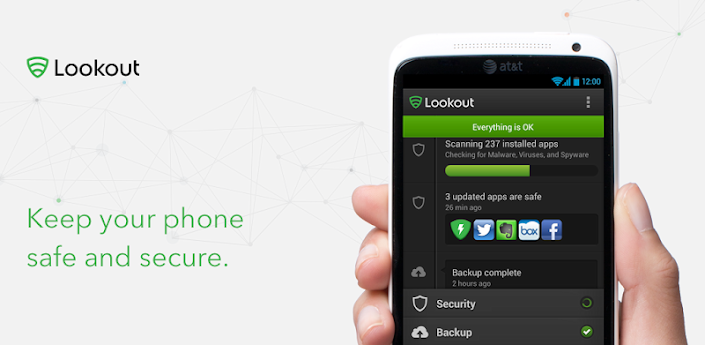
5. Lookout Security

Lookout offers essential protection against all the bad stuff that can happen to your phone or tablet, like malware & viruses, loss, and theft.It also have some features like others.
To download this antivirus click here 

Thanks friends. Hope this information is useful for you to decide best antivirus for your device.
If you like to read more from me plz subscribe my website. thank you...
Subscribe to RSS Feed Follow me on Twitter!